

Introduction
Welcome to EDF Store & Forecast API v1 documentation !
We have tried to make this documentation user-friendly and example-filled, but if you have any questions, please head to our support team: support@edf-sf.com.
Version 2 of the API is out ! You can find the documentation here
Production
Production endpoint enables to get or put site production data.
Get production
GET renewable equipment example:
curl --cacert ca.cert.pem --cert cert.pem --key key.pem
"https://api-preprod.edf-sf.com/v1/100/production/renewable/1?from=1535104800000&to=1535133600000"
The above command returns JSON structured like this:
{
  "status_code": 1000,
  "status_message": "success",
  "results": [
    {
      "timestamp": 1535104800000,
      "id": 1,
      "p": 401.92,
      "q": 9.43
    },
    {
      "timestamp": 1535104801000,
      "id": 1,
      "p": 399.54,
      "q": 8.86
    }
  ]
}
GET method on this endpoint retrieves equipment records for the requested site ID, equipment type and equipment ID.
HTTP Request
GET https://api.edf-sf.com/v1/<site_id>/production/<equipment_type>/<equipment_id>
URL Parameters
| Parameter | Type | Description |
|---|---|---|
| site_id | unsigned int | requested site ID |
| equipment_type | string | equipment type |
| equipment_id | unsigned int | equipment ID |
Query Parameters
| Parameter | Type | Mandatory | Description |
|---|---|---|---|
| from | unsigned int | no | filter records from this ms timestamp - use with to |
| to | unsigned int | no | filter records to this ms timestamp - use with from |
| agg | string | no | aggregate records with min, max or avg function - use with from, to and agg |
| period | string | no | aggregate records over this duration (ex. 30s, 15m or 1h) - use with agg |
Put production
PUT method on this endpoint pushes equipment records for the given site ID and equipment type. Several equipment IDs can be pushed in a single request.
PUT renewable equipment example:
curl --cacert ca.cert.pem --cert cert.pem --key key.pem
-X PUT -H "Content-Type: application/json" -d
'{
  "values": [
   {
     "timestamp": 1535104800000,
     "id": 1,
     "p": 401.92,
     "q": 9.43
   }
  ]
}' "https://api-preprod.edf-sf.com/v1/100/production/renewable"
The above command returns JSON structured like this:
{
  "status_code": 1000,
  "status_message": "success"
}
HTTP Request
PUT https://api.edf-sf.com/v1/<site_id>/production/<equipment_type>
URL Parameters
| Parameter | Type | Description |
|---|---|---|
| site_id | unsigned int | requested site ID |
| equipment_type | string | equipment type |
Equipment types
Supported equipment types
anemometer: wind speed and direction measurebattery: battery energy system storageflexible-load: controllable consumption loadgenset: gensethygrometer: hygrometry measuremeter: AC single-phase metermeter-dc: DC metermeter-3p: AC 3-phases metermetric: metric (float)pyranometer: solar irradiance measurerenewable: renewable production assetsetpoint: setpoint sent to equipmentstatus: status (integer)thermometer: temperature measure
anemometer
Example:
{
  "timestamp": 1535104800000,
  "id": 1,
  "speed": 12.67,
  "direction": 182
}
| Attribute | Type | Unit | Description |
|---|---|---|---|
| timestamp | unsigned int | ms | record UTC timestamp |
| id | unsigned int | - | anemometer id |
| speed | float | m/s | wind speed |
| direction | float | ° | wind direction |
battery
Example:
{
  "timestamp": 1535104800000,
  "id": 1,
  "soc": 78.21,
  "e": 425.3,
  "p": 209.44,
  "p_ch": -1000.0,
  "p_disch": 1000.0,
  "q": -6.37,
  "q_max": 100.0,
  "q_min": -100.0,
  "state": 4
}
| Attribute | Type | Unit | Description |
|---|---|---|---|
| timestamp | unsigned int | ms | record UTC timestamp |
| id | unsigned int | - | battery id |
| soc | float | % | battery SoC (state of charge) |
| e | float | kWh | battery stored energy |
| p | float | kW | battery active power output (p>0: discharge, p<0: charge) |
| p_ch | float | kW | battery maximal charging active power capability |
| p_disch | float | kW | battery maximal discharging active power capability |
| q | float | kvar | battery reactive power output (q<0: capacitive, q>0: inductive) |
| q_max | float | kvar | battery maximal reactive power output capability |
| q_min | float | kvar | battery minimal reactive power output capability |
| state | unsigned int | - | battery state |
state possible values:
| State | Description |
|---|---|
| 0 | battery disabled locally (config), remotely (PCS) or failed |
| 1 | battery is offline, inverter is disconnected from the grid |
| 2 | battery is starting up |
| 3 | battery is starting up in black start mode |
| 4 | battery is ready and in P/Q mode (grid-following) |
| 5 | battery is ready and on power saving mode (idle mode) |
| 6 | battery is ready and under manual control |
| 7 | battery is ready and in U/f mode (grid-forming) |
flexible-load
Example:
{
  "timestamp": 1535104800000,
  "id": 1,
  "p": 31.25,
  "state": 3
}
| Attribute | Type | Unit | Description |
|---|---|---|---|
| timestamp | unsigned int | ms | record UTC timestamp |
| id | unsigned int | - | flexible load id |
| p | float | kW | flexible load active power consumption |
| state | unsigned int | - | flexible load state |
state possible values:
| Value | Description |
|---|---|
| 0 | flexible load controller is unreachable, has failed or is disabled |
| 1 | flexible load is off |
| 2 | flexible load is on with a maximum power cap |
| 3 | flexible load is on without power cap |
genset
Example:
{
  "timestamp": 1535104800000,
  "id": 1,
  "p": 82.36,
  "q": -7.12,
  "state": 3
}
| Attribute | Type | Unit | Description |
|---|---|---|---|
| timestamp | unsigned int | ms | record UTC timestamp |
| id | unsigned int | - | genset id |
| p | float | kW | genset active power output |
| q | float | kvar | genset reactive power output |
| state | unsigned int | - | genset state |
state possible values:
| Value | Description |
|---|---|
| 0 | genset controller is unreachable, has failed or is disabled |
| 1 | genset engine is stopped |
| 2 | genset engine has started, genset is syncing to grid frequency |
| 3 | genset is operational and injecting power into the grid |
hygrometer
Example:
{
  "timestamp": 1535104800000,
  "id": 1,
  "h": 65.25
}
| Attribute | Type | Unit | Description |
|---|---|---|---|
| timestamp | unsigned int | ms | record UTC timestamp |
| id | unsigned int | - | hygrometer id |
| h | float | % | hygrometry measure |
meter
Example:
{
  "timestamp": 1535104800000,
  "id": 1,
  "p": 52.07,
  "q": -4.98,
  "f": 50.01,
  "u": 399.56,
  "i": 0.27
}
| Attribute | Type | Unit | Description |
|---|---|---|---|
| timestamp | unsigned int | ms | record UTC timestamp |
| id | unsigned int | - | meter id |
| p | float | kW | active power measure |
| q | float | kvar | reactive power measure |
| f | float | Hz | frequency measure |
| u | float | V | voltage measure |
| i | float | A | intensity measure |
meter-dc
Example:
{
  "timestamp": 1535104800000,
  "id": 1,
  "p": 52.07,
  "u": 401.84
}
| Attribute | Type | Unit | Description |
|---|---|---|---|
| timestamp | unsigned int | ms | record UTC timestamp |
| id | unsigned int | - | meter id |
| p | float | kW | active power measure |
| u | float | V | voltage measure |
meter-3p
Example:
{
  "timestamp": 1535104800000,
  "id": 2,
  "l1_p": 48.34,
  "l2_p": 49.63,
  "l3_p": 50.88,
  "l1_q": 0.08,
  "l2_q": -0.41,
  "l3_q": 0.72,
  "l1_i": 0.52,
  "l2_i": 0.51,
  "l3_i": 0.49,
  "l12_u": 399.47,
  "l23_u": 401.21,
  "l31_u": 399.95,
  "f": 50.01
}
| Attribute | Type | Unit | Description |
|---|---|---|---|
| timestamp | unsigned int | ms | record UTC timestamp |
| id | unsigned int | - | three phase meter id |
| l1_p | float | kW | phase 1 active power measure |
| l2_p | float | kW | phase 2 active power measure |
| l3_p | float | kW | phase 3 active power measure |
| l1_q | float | kvar | phase 1 reactive power measure |
| l2_q | float | kvar | phase 2 reactive power measure |
| l3_q | float | kvar | phase 3 reactive power measure |
| l1_i | float | A | phase 1 current measure |
| l2_i | float | A | phase 2 current measure |
| l3_i | float | A | phase 3 current measure |
| l12_u | float | V | phase 1-2 voltage measure |
| l23_u | float | V | phase 2-3 voltage measure |
| l31_u | float | V | phase 3-1 voltage measure |
| f | float | Hz | frequency measure |
metric
Example:
{
  "timestamp": 1535104800000,
  "id": 54,
  "value": 49.97
}
| Attribute | Type | Unit | Description |
|---|---|---|---|
| timestamp | unsigned int | ms | record UTC timestamp |
| id | unsigned int | - | metric id |
| value | float | - | metric value |
pyranometer
Example:
{
  "timestamp": 1535104800000,
  "id": 1,
  "irr": 1338.50
}
| Attribute | Type | Unit | Description |
|---|---|---|---|
| timestamp | unsigned int | ms | record UTC timestamp |
| id | unsigned int | - | pyranometer id |
| irr | float | w/m² | irradiance |
renewable
Example:
{
  "timestamp": 1535104800000,
  "id": 1,
  "p": 561.77,
  "q": 17.91
}
| Attribute | Type | Unit | Description |
|---|---|---|---|
| timestamp | unsigned int | ms | record UTC timestamp |
| id | unsigned int | - | renewable asset id |
| p | float | kW | renewable asset active power output |
| q | float | kvar | renewable asset reactive power output |
setpoint
Example:
{
  "timestamp": 1535104800000,
  "id": 3,
  "p": 269.96,
  "q": 0.00,
  "command": 5
}
| Attribute | Type | Unit | Description |
|---|---|---|---|
| timestamp | unsigned int | ms | record UTC timestamp |
| id | unsigned int | - | setpoint id |
| p | float | kW | active power setpoint |
| q | float | kvar | reactive power setpoint |
| command | unsigned int | - | command word |
status
Example:
{
  "timestamp": 1535104800000,
  "id": 102,
  "value": 3
}
| Attribute | Type | Unit | Description |
|---|---|---|---|
| timestamp | unsigned int | ms | record UTC timestamp |
| id | unsigned int | - | status id |
| value | unsigned int | - | status value |
thermometer
Example:
{
  "timestamp": 1535104800000,
  "id": 10,
  "t": 25.50
}
| Attribute | Type | Unit | Description |
|---|---|---|---|
| timestamp | unsigned int | ms | record UTC timestamp |
| id | unsigned int | - | thermometer id |
| t | float | °C | temperature measure |
Forecast
The forecast endpoint can be used to GET or PUT forecast data for a given site.
Forecasts are stored as vectors of forecast periods.
Forecast periods obey the left convention (or beginning convention), which means that a forecast period is effective starting from its timestamp until the timestamp of the next forecast period.
Forecast attributes:
| Attribute | Type | Unit | Description |
|---|---|---|---|
| creation_timestamp | unsigned int | ms | forecast generation time (UTC timestamp) |
| id | unsigned int | - | forecast id |
| values | list | - | forecast periods list (see forecast types section for more details on forecast periods attributes) |
Get forecast
GET method on this endpoint returns forecast vector for the requested site ID, forecast type and forecast ID.
GET solar forecast example:
curl --cacert ca.cert.pem --cert cert.pem --key key.pem
"https://api-preprod.edf-sf.com/v1/100/forecast/solar/1?from=1535104800000&to=1535106600000"
The above command returns JSON structured like this:
{
  "status_code": 1000,
  "status_message": "success",
  "results": [
    {
      "creation_timestamp": 1535104800000,
      "id": 1,
      "values": [
        {
          "timestamp": 1535104800000,
          "p": 1572.64,
          "quality": 1
        },
        {
          "timestamp": 1535106600000,
          "p": 1650.94,
          "quality": 1
        }
      ]
    }
  ]
}
Forecast vectors can be filtered according to their creation date with generated-after and generated-before parameters. A selected forecast vector can be filtered with from, to parameters.
See examples to get a visual example.
HTTP Request
GET https://api.edf-sf.com/v1/<site_id>/forecast/<forecast_type>/<forecast_id>
URL Parameters
| Parameter | Type | Description |
|---|---|---|
| site_id | unsigned int | requested site ID |
| forecast_type | string | forecast type |
| forecast_id | unsigned int | forecast ID |
Query Parameters
| Parameter | Type | Mandatory | Description |
|---|---|---|---|
| generated-after | unsigned int | no | filter forecast created after this ms timestamp - use with generated-before |
| generated-before | unsigned int | no | filter forecast created before this ms timestamp - use with generated-after |
| generate-all | bool | no | if set to true, request returns all vectors in [generated-after; generated-before[, otherwise only the latest in the considered interval - use with generated-after and generated-before |
| from | unsigned int | no | filter records from this ms timestamp - use with to |
| to | unsigned int | no | filter records to this ms timestamp - use with from |
| agg | string | no | aggregate records with min, max or avg function - use with from, to and agg |
| period | string | no | aggregate records over this duration (ex. 30s, 15m or 1h) - use with agg |
Put forecast
PUT method on this endpoint pushes forecast vectors for the given site ID and forecast type. Several forecast vectors with different forecast IDs can be pushed in a single request.
PUT wind forecast example:
curl --cacert ca.cert.pem --cert cert.pem --key key.pem
-X PUT -H "Content-Type: application/json" -d
'{
  "values": [
     {
        "creation_timestamp": 1535104800000,
        "id": 1,
        "values": [
          {
            "timestamp": 1535104800000,
            "p": 1572.64,
            "quality": 1
          },
          {
            "timestamp": 1535106600000,
            "p": 1650.94,
            "quality": 1
          }
        ]
     }
  ]
}' "https://api-preprod.edf-sf.com/v1/100/forecast/wind"
The above command returns JSON structured like this:
{
  "status_code": 1000,
  "status_message": "success",
}
HTTP Request
PUT https://api.edf-sf.com/v1/<site_id>/forecast/<forecast_type>
URL Parameters
| Parameter | Type | Description |
|---|---|---|
| site_id | unsigned int | requested site ID |
| forecast_type | string | forecast type |
Forecast types
Demand
Example:
{
  "timestamp": 1535104800000,
  "p": 411.08,
  "quality": 1
}
Forecast type: demand
| Attribute | Type | Unit | Description |
|---|---|---|---|
| timestamp | unsigned int | ms | forecast UTC timestamp |
| p | float | kW | demand forecast |
| quality | unsigned int | - | forecast quality |
Solar
Example:
{
  "timestamp": 1535104800000,
  "p": 350.66,
  "quality": 1
}
Forecast type: solar
| Attribute | Type | Unit | Description |
|---|---|---|---|
| timestamp | unsigned int | ms | forecast UTC timestamp |
| p | float | kW | solar production forecast |
| quality | unsigned int | - | forecast quality |
Wind
Example:
{
  "timestamp": 1535104800000,
  "p": 1475.58,
  "quality": 1
}
Forecast type: wind
| Attribute | Type | Unit | Description |
|---|---|---|---|
| timestamp | unsigned int | ms | forecast UTC timestamp |
| p | float | kW | wind production forecast |
| quality | unsigned int | - | forecast quality |
Aggregate
Example:
{
  "timestamp": 1535104800000,
  "p": 627.34,
  "quality": 1
}
Forecast type: aggregate
| Attribute | Type | Unit | Description |
|---|---|---|---|
| timestamp | unsigned int | ms | forecast UTC timestamp |
| p | float | kW | production forecast |
| quality | unsigned int | - | forecast quality |
Commitment
The commitment endpoint can be used to GET or PUT commitment data for a given site.
Commitments are stored as vectors of commitment periods.
Commitment periods obey the left convention (or beginning convention), which means that a commitment period is effective starting from its timestamp until the timestamp of the next commitment period.
Commitment attributes:
| Attribute | Type | Unit | Description |
|---|---|---|---|
| creation_timestamp | unsigned int | ms | commitment generation time (UTC timestamp) |
| id | unsigned int | - | commitment id |
| quality | unsigned int | - | quality of the forecast used to generate the commitment |
| values | list | - | commitment periods list |
Commitment period attributes:
| Attribute | Type | Unit | Description |
|---|---|---|---|
| timestamp | unsigned int | ms | commitment period start time (UTC timestamp) |
| value | float | - | commitment value, unit depends on the commitment (i.e. kW, kvar, kWh) |
Get commitment
GET method on this endpoint returns commitment vector for the requested site ID and commitment ID.
GET commitment example:
curl --cacert ca.cert.pem --cert cert.pem --key key.pem
"https://api-preprod.edf-sf.com/v1/100/commitment/1?from=1535104800000&to=1535106600000"
The above command returns JSON structured like this:
{
  "status_code": 1000,
  "status_message": "success",
  "results": [
    {
      "creation_timestamp": 1535104800000,
      "id": 1,
      "quality": 1,
      "values": [
        {
          "timestamp": 1535104800000,
          "value": 1100.0
        },
        {
          "timestamp": 1535106600000,
          "value": 950.4
        }
      ]
    }
  ]
}
Commitment vectors can be selected according to their creation date with generated-after and generated-before parameters. A selected commitment vector can be filtered with from, to parameters.
See examples to get a visual example.
HTTP Request
GET https://api.edf-sf.com/v1/<site_id>/commitment/<commitment_id>
URL Parameters
| Parameter | Type | Description |
|---|---|---|
| site_id | unsigned int | requested site ID |
| commitment_id | unsigned int | commitment ID |
Query Parameters
| Parameter | Type | Mandatory | Description |
|---|---|---|---|
| generated-after | unsigned int | no | filter commitment created after this ms timestamp - use with generated-before |
| generated-before | unsigned int | no | filter commitment created before this ms timestamp - use with generated-after |
| generate-all | bool | no | if set to true, request returns all vectors in [generated-after; generated-before[, otherwise only the latest in the considered interval - use with generated-after and generated-before |
| from | unsigned int | no | filter records from this ms timestamp - use with to |
| to | unsigned int | no | filter records to this ms timestamp - use with from |
| agg | string | no | aggregate records with min, max or avg function - use with from, to and agg |
| period | string | no | aggregate records over this duration (ex. 30s, 15m or 1h) - use with agg |
Put commitment
PUT method on this endpoint pushes commitment vectors for the given site ID. Several commitment vectors with different commitment ID can be pushed in a single request.
PUT commitment example:
curl --cacert ca.cert.pem --cert cert.pem --key key.pem
-X PUT -H "Content-Type: application/json" -d
'{
  "values": [
     {
        "creation_timestamp": 1535104800000,
        "id": 1,
        "quality": 1,
        "values": [
            {
              "timestamp": 1535104800000,
              "value": 1100.0
            },
            {
              "timestamp": 1535106600000,
              "value": 950.4
            }
        ]
     }
  ]
}' "https://api-preprod.edf-sf.com/v1/100/commitment"
The above command returns JSON structured like this:
{
  "status_code": 1000,
  "status_message": "success"
}
HTTP Request
PUT https://api.edf-sf.com/v1/<site_id>/commitment
URL Parameters
| Parameter | Type | Description |
|---|---|---|
| site_id | unsigned int | requested site ID |
Tariff
The tariff endpoint can be used to GET or PUT tariff data for a given site.
Tariffs are stored as vectors of tariff periods.
Tariff periods obey the left convention (or beginning convention), which means that a tariff period is effective starting from its timestamp until the timestamp of the next tariff period.
Tariff attributes:
| Parameter | Type | Unit | Description |
|---|---|---|---|
| id | unsigned int | - | tariff id |
| values | list | - | tariff periods list |
Tariff period attributes:
| Parameter | Type | Unit | Description |
|---|---|---|---|
| timestamp | unsigned int | ms | tariff period start time (UTC timestamp) |
| label | string | kW | tariff period label, used to identify specific period (i.e. on-peak) |
| value | float | - | tariff period value, unit depends on the tariff (currency/kW or currency/kWh) |
Example:
{
    "id": 1,
    "values": [
        {
        "timestamp": 1535104800000,
        "label": "on-peak",
        "value": 9.85
        }
    ]
}
Get tariff
GET method on this endpoint returns tariff periods for the requested site ID and tariff ID.
GET tariff example:
curl --cacert ca.cert.pem --cert cert.pem --key key.pem
"https://api-preprod.edf-sf.com/v1/100/tariff/1?from=1535104800000&to=1535107000000"
The above command returns JSON structured like this:
{
    "status_code": 1000,
    "status_message": "success",
    "results": [
        {
            "id": 1,
            "values": [
                {
                    "timestamp": 1540486800000,
                    "label": "on-peak",
                    "value": 9.85
                },
                {
                    "timestamp": 1540501200000,
                    "label": "off-peak",
                    "value": 5.2
                },
                {
                    "timestamp": 1540573200000,
                    "label": "on-peak",
                    "value": 9.85
                },
                {
                    "timestamp": 1540587600000,
                    "label": "off-peak",
                    "value": 5.2
                }
            ]
        }
    ]
}
Tariff periods can be filtered with from, to parameters.
HTTP Request
GET https://api.edf-sf.com/v1/<site_id>/tariff/<tariff_id>
URL Parameters
| Parameter | Type | Description |
|---|---|---|
| site_id | unsigned int | requested site ID |
| tariff_id | unsigned int | tariff ID |
Query Parameters
| Parameter | Type | Mandatory | Description |
|---|---|---|---|
| from | unsigned int | no | filter records from this ms timestamp - use with to |
| to | unsigned int | no | filter records to this ms timestamp - use with from |
Put tariff
PUT method on this endpoint pushes tariff periods for the requested site ID. Several tariffs periods with different tariff IDs can be pushed in a single request.
PUT tariff example:
curl --cacert ca.cert.pem --cert cert.pem --key key.pem
-X PUT -H "Content-Type: application/json" -d
'{
    "values": [
        {
            "id": 1,
            "values": [
                {
                    "timestamp": 1540486800000,
                    "label": "on-peak",
                    "value": 9.85
                },
                {
                    "timestamp": 1540501200000,
                    "label": "off-peak",
                    "value": 5.2
                }
            ]
        }
    ]
}' "https://api-preprod.edf-sf.com/v1/100/tariff"
The above command returns JSON structured like this:
{
  "status_code": 1000,
  "status_message": "success"
}
HTTP Request
PUT https://api.edf-sf.com/v1/<site_id>/tariff
URL Parameters
| Parameter | Type | Description |
|---|---|---|
| site_id | unsigned int | requested site ID |
Status codes
HTTP status codes
Here are the HTTP status codes that can be returned by our API:
| Status | Description | Returned when |
|---|---|---|
| 200 | OK | GET request succeeded |
| 201 | Created | PUT request succeeded |
| 206 | Partial content | GET request response content is incomplete |
| 400 | Bad request | requested id is unknown, parameters are not consistent or payload is malformed |
| 403 | Forbidden | client certificate does not have the necessary permissions for the requested resource |
| 404 | Not found | endpoint requested does not match with EDF S&F API endpoints pattern |
| 405 | Method Not Allowed | request HTTP method is not GET or PUT |
| 500 | Internal server error | something went wrong on EDF S&F API server side |
API status codes
Here are the API status codes that can be returned by our API in response payloads:
| Status | Description | Returned when |
|---|---|---|
| 1000 | success | request succeeded |
| 1001 | partial response | GET request response content is incomplete. Response has been truncated because the request returned too many records |
| 1101 | invalid endpoint | endpoint requested is invalid |
| 1102 | invalid method | request HTTP method is not GET or PUT |
| 1103 | invalid header | request header is missing or invalid |
| 1104 | invalid site_id | site_id used in request is invalid |
| 1105 | invalid category | category in request endpoint is not equipment, forecast, commitment or tariff |
| 1106 | invalid type | equipment or forecast type used in request is invalid |
| 1107 | invalid id | equipment, forecast, commitment or tariff id used in request is invalid |
| 1200 | invalid parameters | parameters combination used in request is invalid |
| 1201 | invalid from | from parameter used in request is invalid |
| 1202 | invalid to | to parameter used in request is invalid |
| 1203 | invalid generated-after | generated-after parameter used in request is invalid |
| 1204 | invalid generated-before | generated-before parameter used in request is invalid |
| 1205 | invalid agg | agg parameter used in request is invalid |
| 1206 | invalid period | period parameter used in request is invalid |
| 1301 | payload encoding error | server failed to decode the PUT request payload |
| 1302 | payload empty error | PUT request payload is empty |
| 1303 | payload content error | PUT request payload content is invalid |
| 1400 | permission error | client certificate is missing or does not have the necessary permissions to access the requested resource |
| 1500 | server error | EDF S&F API server internal error |
Examples
Forecast and commitments parameters
- generated_before, generated_after:
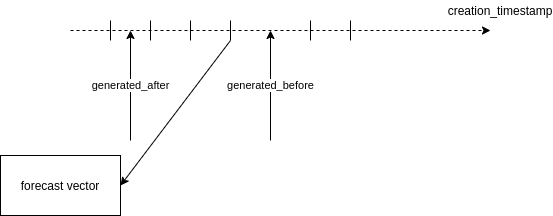
The vector extracted is the most recent created in the [generated_after, generated_before[ interval.
- from, to:

The vector contains exclusively data with timestamps in the [from, to[ interval.
Python
Python GET request example on
productionendpoint:
import requests

# certification authority certificate
ca_cert = 'ca.cert.pem'

# client certificate and private key
client_certs = ('cert.pem', 'pkey.pem')

# request to production endpoint for site 100 and battery 1
endpoint = "https://api-preprod.edf-sf.com/v1/100/production/battery/1"

headers = {
    'Accept': 'application/json',
}

# request data interval [2018-11-10 12:00:00 UTC, 2018-11-12 20:00:00 UTC[
# aggregated with average function over 1mn periods
params = {
    'from': 1541851200000,
    'to': 1541880000000,
    'agg': 'avg',
    'period': '1m'
}

r = requests.get(endpoint,
                 verify=ca_cert,
                 cert=client_certs,
                 headers=headers,
                 params=params)

if r.status_code != 200:
    print('request failed: unexpected HTTP status ({})'.format(r.status_code))
else:
    print(r.json())